|
Unit 3: HTML & Photoshop
Students will begin their experience of developing programming skills by building web pages using HTML. They will also learn Photoshop, a graphics program that will add functionality of their web pages. |
|
|
Purpose |
|
| Following Directions |
Computer Code Needs To be Precise…and Coders Need to Think In These Terms. |
Click here. |
| 1. Internet, Browser & Search Engines. |
Understanding The Internet & Search Engines. Students compete in a Treasure Hunt. |
Click here. |
2a. My First Web Page!
2b. My Second Web Page! |
Students will learn how to create a basic first web page.
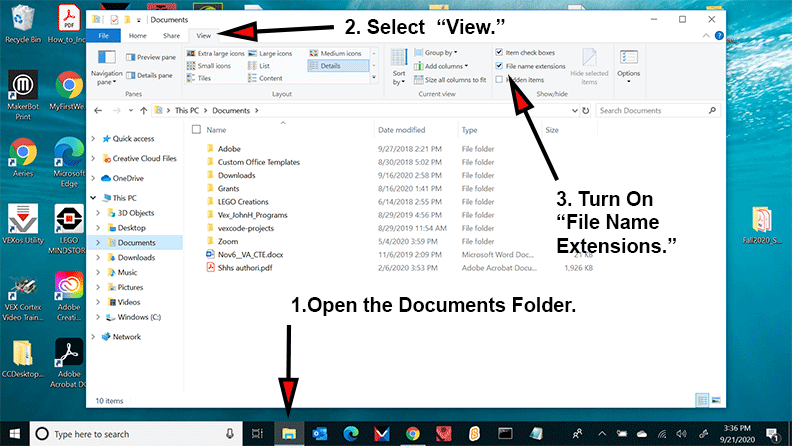
Instructions to turn on your PC Extensions: Click Here.
Mac Users, click here for Tips: Click Here.
Students will apply the skills they learned when building their first web page in the creation of a second web page. In the process of making the page, they will learn a number of formatting skills. Note: Students are provided with the code.
Hexadecimal Color Sheet. |
My First Web Page.
My Second Web Page. |
| 3. Basic Website. |
Students will build their first website that will consist of two pages, images, formatted texts and links. Note: Students are provided with the code. |
Click here. |
| 4. Review - Basic Web Site. |
Students will build a second website by applying the skills they acquired when they built the first website. |
Click here. |
| 5. Structure - "Files&Folders" |
Students will understand how to write the code to create links to images and web pages stored in folders on multiples levels. Note: Students are provided with the code. |
Click here. |
| 6. Text Wrap |
Students will learn how to wrap text around an image. Note: Students are provided with the code. |
Click here. |
| 7. Review - Text Wrap |
Students will wrap text around an image by applying the skills they learned in the previous lesson. |
Click here. |
| 8. Tables, Lists, HR & Bkgrnd Image. |
Students will learn how to use tables, lists, horizontal rules and background images. Note: Students are provided with the code. |
Click here. |
| 9. Review - Tables, Lists, HR & Bkgrnd Image. |
Students will develop a web page incorporating tables, lists, horizontal rules and background images by applying the skills they learned in the previous lesson. |
Click here. |
| Photoshop |
Students will learn how to create graphics using the application Photoshop. This skill will be used in many of their future projects. |
Click here. |
| Final Project |
Student Resort Website |
|
| Model Resort Website |
Students will apply their HTML skills in the development of a website for their own personal Five Star Resort. Enclosed is the Model Resort Website reflecting all the skills required on the Gradesheet.
|
Click here. |
| View Former Student Resort Websites: |
Students can view former students Resort Websites for ideas and project expectations. |
Click here. |
| Develop A Storyboard |
Students will develop a storyboard reflecting the content and structure of their websites Using Google Draw. |
Click here. |
| Develop Resort Website_Gradesheet |
Students will develop their websites based on the criteria stated on the gradesheet.
Hexadecimal Color Sheet.
|
Click here. |
| Cascading Style Sheets |
| Cascading Style Sheets |
Students will learn how to build websites based upon Cascading Style Sheets. |
Click here. |
| Professional Web Services |
| Dreamweaver |
Dreamweaver, is an application used by professional developers to build websites for their businesses. |
Click here. |
| Square Space |
Students will use an online service designed for individuals who may not have any web development skills, but instead allows them to create a professional website based on premade templates. |
Click here. |